

Revit plugin
BWIC Extractor
Know exactly what passes through every BWIC opening.
BWIC Extractor tests each BWIC opening against the model and its links using Revit's own geometric intersection engine, then writes the findings to Excel or back into the model.
Overview
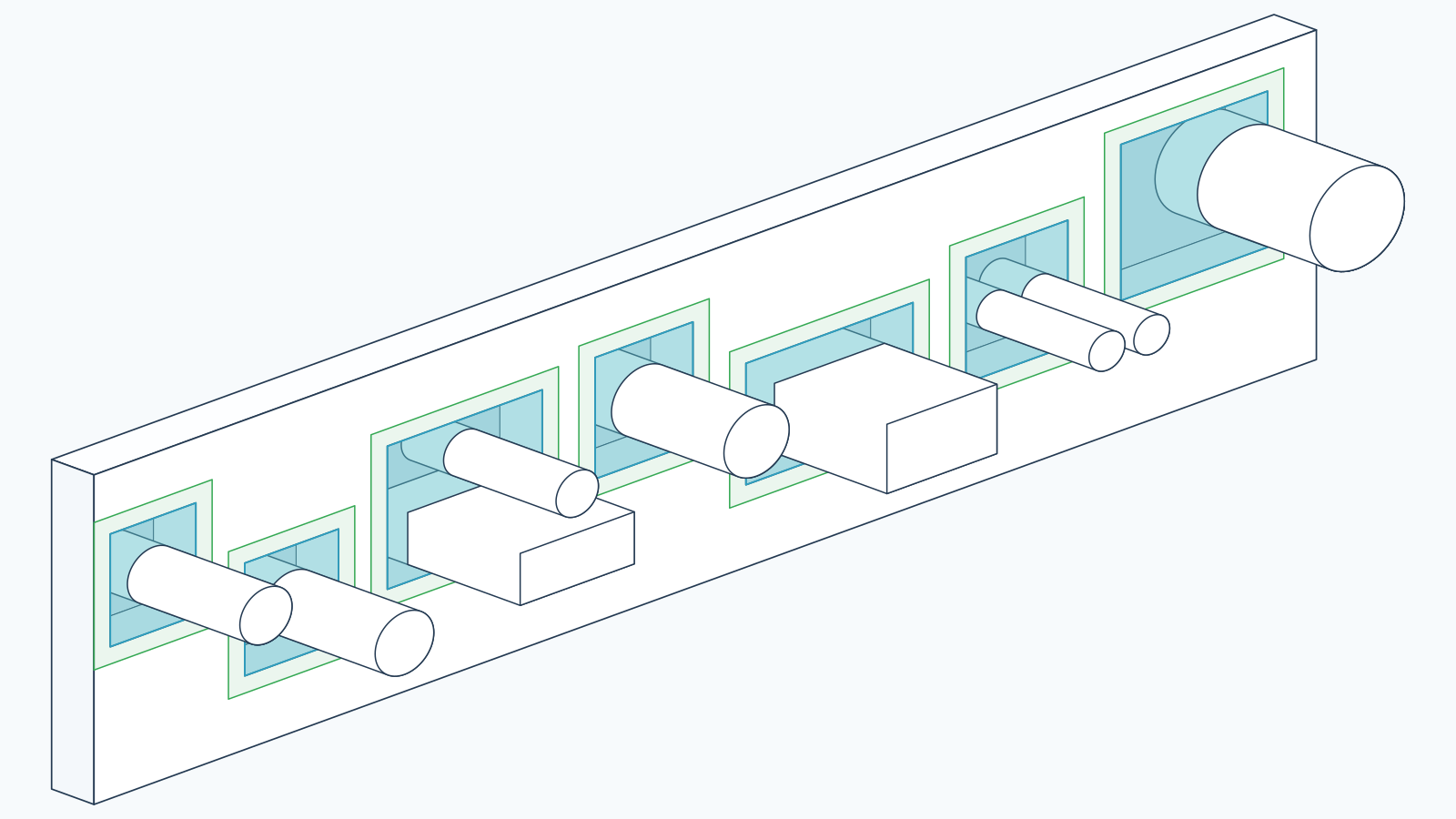
What actually passes through this opening?
You select BWIC family instances in the active document, choose which models to search and in which role, and the add-in runs Revit's own geometric intersection engine against each opening. Results are written either into instance parameters on the BWIC family itself, or out to an Excel workbook.
The tool is built for federated coordination. Architectural hosts usually sit in one model and MEP services in another, so every model — the active document and each loaded link — can be searched as a host, as a service carrier, or both. Because a BWIC void cuts its host, a half-millimetre probe recovers the walls and floors the opening passes through.
Capabilities
What it does
Geometric intersection testing
Uses Revit's native intersection engine against the opening's real solids. A coarse bounding-box pass narrows candidates first, so elements merely passing nearby are not reported.
Federated link search
Each loaded Revit link is listed with two ticks, Hosts and Services, and searched with its own transform applied. One entry per link, roles merged, so a model is never scanned twice.
Configurable service definition
A catalogue of thirty-six MEP and equipment categories, with the standard MEP set pre-ticked, decides what counts as a service for this run — both what is collected and what the MEP count reports.
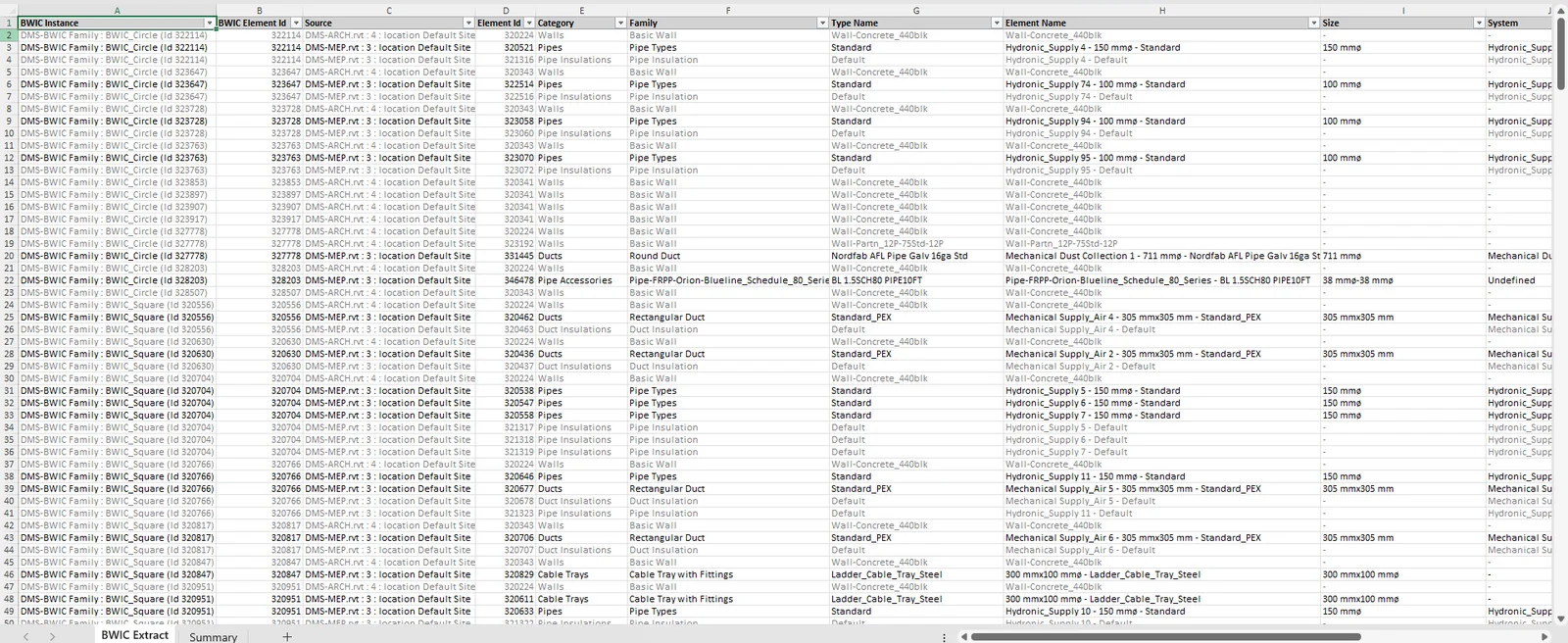
Excel workbook export
Writes a workbook with a fourteen-column detail sheet plus a summary sheet carrying totals, MEP counts and grand totals. Every row states whether it was counted, and why.
Parameter write-back
Writes the intersecting element names and the MEP count into text instance parameters on the BWIC family, creating them as shared parameters when they are absent.
Auditable results
The run summary names every element found, its verdict, the geometry strategy used, candidates scanned, the search-box coordinates, and anything skipped because a workset was closed.
Choosing between the two
Extractor reports. Compliance judges.
BWIC Extractor answers which elements pass through an opening and how many of them are services, and hands you that list in Excel or in the model's own parameters. It holds no library of tested systems and makes no pass-or-fail judgement.
BWIC Compliance takes the same geometric groundwork further, validating openings against a tested-systems library with annular gap and opening-shape analysis.
Choose Extractor when you need a fast, verifiable inventory of penetrations. Choose Compliance when the output has to be a verdict. Extractor is priced at exactly half of Compliance at every tier.
How it works
Five steps, inside Revit.
Launch from the ribbon
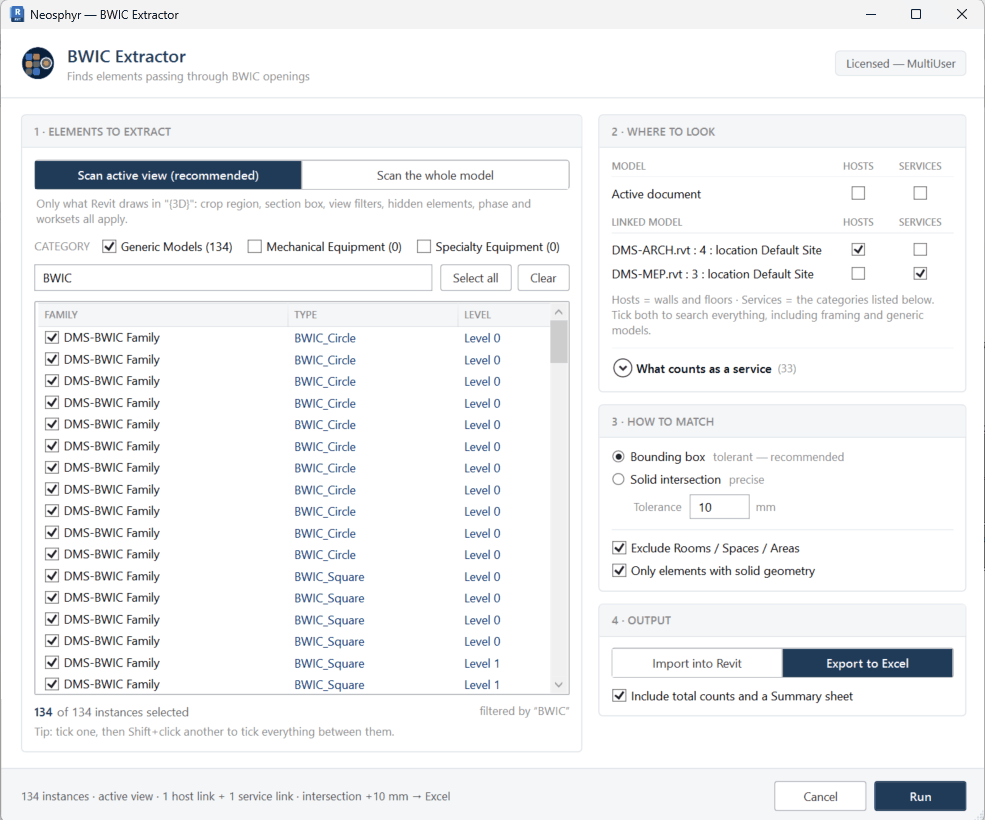
Open the tool from its ribbon panel. It collects every family instance in Generic Models, Mechanical Equipment and Specialty Equipment.
Select the openings
Filter the candidate list by category and by a family-name term — pre-filled with BWIC — then tick the instances to process.
Choose where to look
Set the scan to the active view or the whole model, and tick the active document and each link as Hosts, Services, or both.
Set the matching rule
Choose bounding box with a tolerance in millimetres, or strict solid intersection, and decide whether to exclude rooms and spaces.
Import or export
Run, then write the results into the BWIC instance parameters or save them as an Excel workbook. A summary reports exactly what was written.
Benefits
What changes day to day
- Replaces manual opening-by-opening inspection with a repeatable geometric test.
- Results that live in the model, not only in a spreadsheet.
- Host walls and floors recovered even though the void has cut them.
- A pipe and its insulation count as one service, not two.
- Every count traceable to a named element and a stated reason.
- Elements hidden by a closed workset are reported, never silently dropped.
Specification
The facts
- Revit versions
- 2024 · 2025 · 2026 · 2027
- Operating system
- Windows
- Openings detected
- Family instances in Generic Models, Mechanical Equipment and Specialty Equipment, narrowed by an editable family-name filter
- Scan scope
- Active view or whole model; the active document and any loaded Revit link
- Model roles
- Hosts and Services, set per model
- Service categories
- 36 selectable categories covering mechanical, electrical, public health, fabrication and containment
- Matching modes
- Bounding box with a tolerance in millimetres, or strict solid intersection
- Export format
- Excel workbook — a fourteen-column detail sheet plus an optional summary sheet
- Parameter write-back
- Two text instance parameters: the element-name list and the MEP count. Created as shared parameters when absent; read-only parameters are reported, never overwritten.
- Counting rule
- Insulation collapses onto its host pipe or duct, and elements in one identified service run count once
Pricing
BWIC Extractor licences
Annual, per named seat, two devices each. Every plan is the complete product — the tiers differ only in how many people may use it.
All prices exclude VAT. Any tax that applies where you are is calculated and shown at checkout.
| Plan | Seats | Per year, excl. VAT |
|---|---|---|
| Individual | 1 user | £375 |
| Multi User | 3 users | £975 |
| Business | 10 users | £2,750 |
| Corporate | 25 users | £5,625 |
Download
Get the installer
Version 1.0.4, signed, free to download. One installer covers Revit 2024, 2025, 2026 and 2027 — it detects what you have and ticks those versions for you.
You will need a licence key to use it, and a 14-day trial key is free. System requirements · Ask for a trial key
BWIC Extractor
Revit 2024 · 2025 · 2026 · 2027 — Windows
1.0.4·7.1 MB·MSI·signed
Test project
A sample project to extract from
If you do not have a model with builders work openings to hand, this one is ready to go: a main model with an architectural and an MEP link, with openings already modelled and hosts and services to read. The same project is used by BWIC Compliance, so you can see both plug-ins on the same model.
The records in it describe no real manufacturer, product or test report. They are there to show how the software behaves, and must never be used to justify anything that gets built.
Test project
Revit 2024 and later · three linked models + one data pack
Questions
Frequently asked
Is this clash detection?
No. It reports what intersects the BWIC openings you select. It is not a general interference check and has no clash-management workflow.
Does it validate the openings?
No. Extractor reports what is there. It holds no tested-systems library and makes no pass-or-fail judgement — that is what BWIC Compliance does.
Does it calculate quantities?
It extracts identities and counts: element names, type names, the size strings held on the elements, and a count of distinct services. It does not compute areas, volumes, lengths or annular gaps.
Which parameters does it write to?
Two named text instance parameters — one holding the list of intersecting element names, one holding the MEP count. When they are missing they are created as shared parameters bound to Generic Models.
How are linked models handled?
Each loaded link can be searched as a host source, a service source, or both. One limitation is worth knowing: Revit exposes no per-view collector for a linked document, so when you restrict a scan to the active view that restriction cannot be applied to links — they are searched in full within each opening's search box.
How accurate is the intersection test?
It uses Revit's own solid-intersection engine, so the geometry gives the answer. Some cases need care: in-place families and faceted imported geometry can produce many small solids, elements without solid geometry fall back to a bounding-box approximation, and strict solid mode deliberately omits the cut host.
Try BWIC Extractor for 14 days.
Full functionality, no features disabled. Tell us your Revit version and we will set it up.